Your business
Invoice
No. INV-2026-001
| Description | Qty | Unit price | Amount |
|---|---|---|---|
| Add a line to get started. | |||
Subtotal£0.00
Total£0.00
A sole trader who is not VAT-registered sends an invoice with no VAT and no VAT number. It still carries a unique number, your name and any business name, both addresses, a description, the supply and invoice dates and the total owed. The generator below is set for the UK and adds no VAT.
No sign-up · No watermark · Your data stays on your device
Your browser is blocking storage (private browsing?): this document will not be kept if you close the page. Download it before leaving.
This browser's storage is full: the document stays on screen but is no longer saved. Remove an image or delete old documents.
This document link is invalid or incomplete. Ask the sender to send it again.
Line deleted.
Amount due£0.00
| Description | Qty | Unit price | Amount |
|---|---|---|---|
| Add a line to get started. | |||
Every invoice needs a unique identification number; your name, address and contact information; the name and address of the customer; a clear description of what you charge for; the supply date; the invoice date; the amounts charged; and the total owed (gov.uk, Invoicing and taking payment from customers).
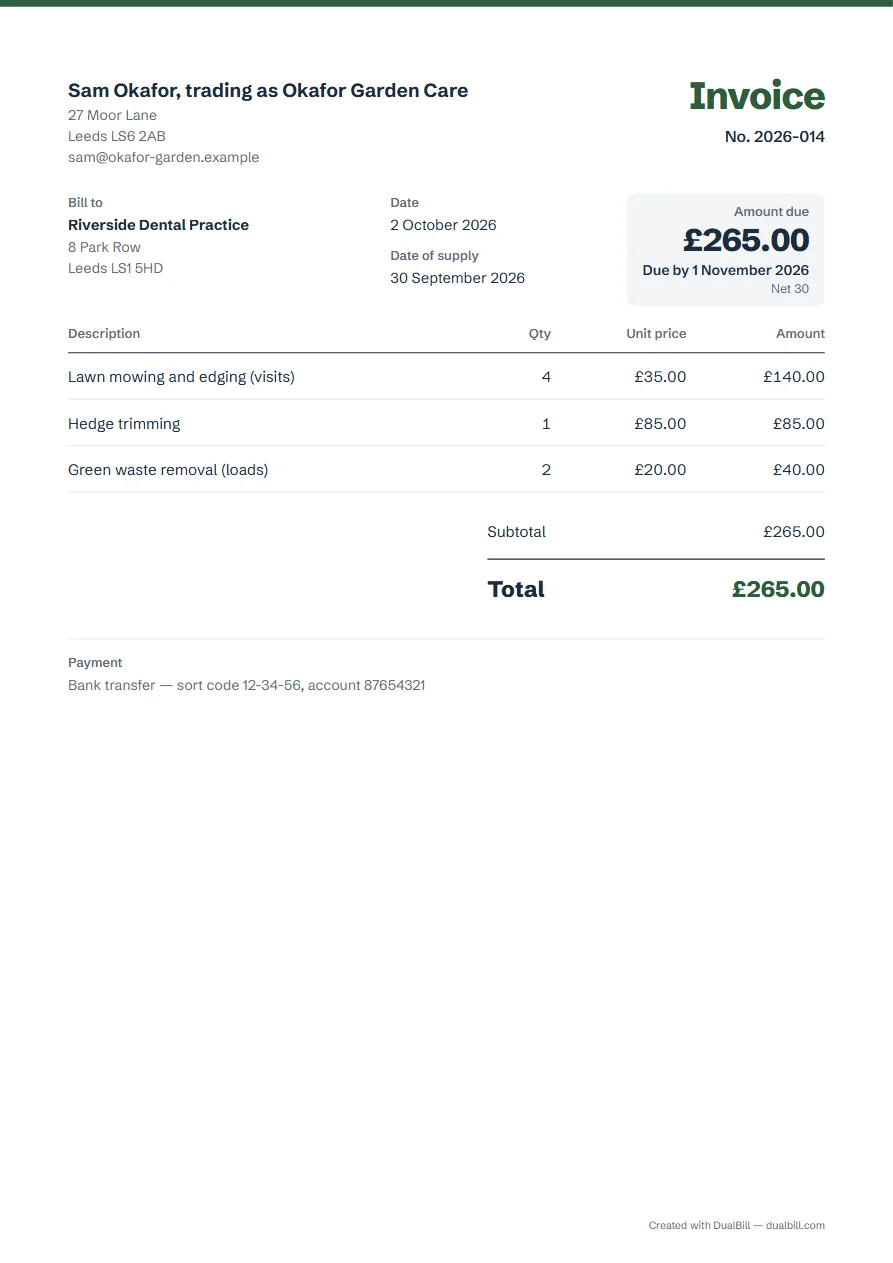
As a sole trader, also show your name and any business name you use and, when you trade under a business name, an address where legal documents can be delivered to you. In the generator, both names fit in “Name or business”, for example “Sam Okafor, trading as Okafor Garden Care”.
The same gov.uk list asks for a VAT amount only “if applicable”. Until you are registered, leave it out: with the country set to United Kingdom and no number in “Your IDs and logo”, the generator charges none, and the total is the plain sum of your lines.
The fictitious gardener in the example bills a dental practice: four lawn visits at £35, a hedge trim at £85 and two green-waste loads at £20, so £265.00 to pay. The work ended on 30 September and the invoice is dated 2 October, so both dates are printed, the second one as “Date of supply”.
Unless you agree a payment date, your customer must pay within 30 days of getting your invoice or the goods or service (gov.uk, Invoicing: payment obligations). Choose a delay in “Payment terms”: the due date then appears under the amount to pay.
Registration becomes compulsory when your taxable turnover for the last 12 months goes over £90,000, the VAT threshold, or when you expect it to pass £90,000 in the next 30 days (gov.uk, Register for VAT, read on 12 October 2026). If you passed it over the last 12 months, register within 30 days of the end of that month. Below the threshold, you may still register voluntarily.
Taxable turnover means everything you sell that is not exempt or out of scope, zero-rated and reduced-rated sales included.
Between applying and receiving the number, you cannot add VAT to your invoices, but you can raise your prices to cover the VAT you will owe HMRC from your effective date of registration; once the number arrives, you reissue those invoices showing the VAT (gov.uk). Enter the number in the generator and it moves to the standard rate: the extra details a VAT invoice needs are on the UK VAT invoice page.
No. An invoice asks to be paid; a receipt acknowledges a payment (gov.uk). Once your customer has paid, you can issue a receipt with the same details.
Show the full company name as it appears on the certificate of incorporation. If you put directors' names on your invoices, you must include all of them (gov.uk, Invoicing).
You have the right to charge interest for late payment, but you can choose not to (gov.uk, Invoicing: payment obligations). Any interest you add goes in “Notes”, under “Payment and notes”.