Your business
Invoice
No. INV-2026-001
| Description | Qty | Unit price | Amount |
|---|---|---|---|
| Add a line to get started. | |||
SubtotalAED 0.00
VAT (5%)AED 0.00
TotalAED 0.00
A UAE tax invoice is issued by a VAT-registered business within 14 days of the supply. It displays the words “Tax Invoice”, your TRN, your client's TRN when they are registered, and the VAT in dirhams. The generator below is set for the UAE: add your TRN and it prints one in English.
No sign-up · No watermark · Your data stays on your device
Your browser is blocking storage (private browsing?): this document will not be kept if you close the page. Download it before leaving.
This browser's storage is full: the document stays on screen but is no longer saved. Remove an image or delete old documents.
This document link is invalid or incomplete. Ask the sender to send it again.
Line deleted.
Amount dueAED 0.00
| Description | Qty | Unit price | Amount |
|---|---|---|---|
| Add a line to get started. | |||
Article 59(1) of the Executive Regulation lists them: the words “Tax Invoice”, clearly displayed; your name, address and TRN; your client's name, address and TRN, if they are registered; a sequential or unique number; the date of issue; the date of supply, if it differs; a description of what you supply; for each line, the unit price, the quantity, the VAT rate and the amount payable in dirhams; any discount; the gross amount payable in dirhams; the VAT in dirhams, with the exchange rate if you bill in another currency; and, for a reverse charge supply, a statement that the recipient accounts for the VAT, with a reference to the law.
In the generator, the TRN goes in “Your details”, your client's in “Client: type and IDs”, the date of supply in “Number and dates”, and the reverse charge statement, which cites article 48 of the Decree-Law, in “Legal notices”. To check the 5% VAT on a single amount, use the VAT calculator.
Article 59(5) allows a simplified tax invoice when your client isn't registered for VAT, or when they are and the supply doesn't exceed AED 10,000, but never for a reverse charge supply. It keeps five details: the words “Tax Invoice”; your name, address and TRN; the date of issue; a description; and the total with the VAT, in dirhams.
The generator always prints the full set, which include these five. Under “Required details”, a note tells you when the simplified form would be possible.
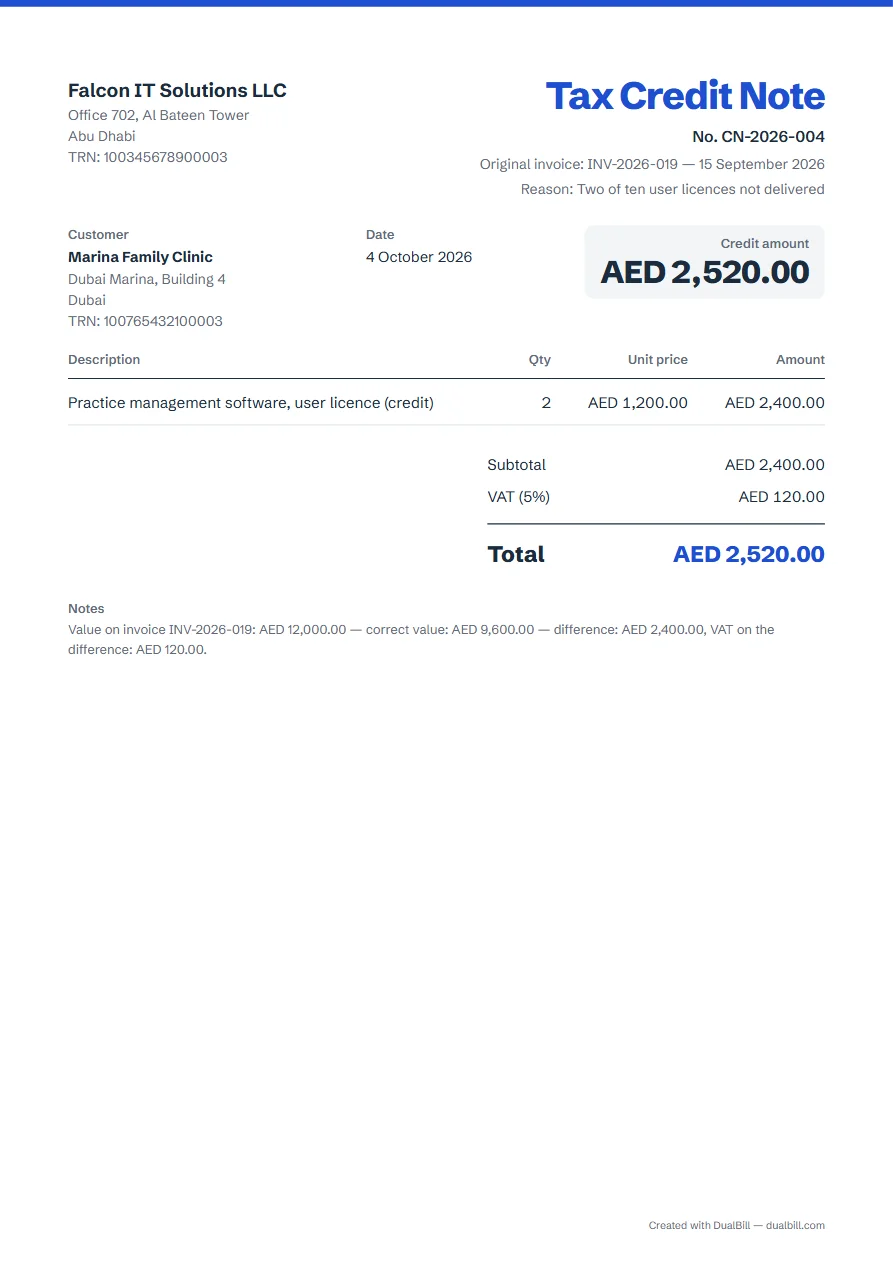
To reduce an amount already billed, a registered business issues a tax credit note. Article 60 asks for the words “Tax Credit Note”, both parties' details and TRNs, the date of issue, the value first billed, the correct value, the difference and the VAT on that difference in dirhams, a brief explanation, and enough to identify the supply.
Choose the credit note as the document type: with your TRN, its title reads “Tax Credit Note”. Fill in the original number and date, then the “Reason for the credit note”; set out the original value, the correct value and the difference in the lines or the notes.
The Decree-Law gives a registered business 14 days from the date of supply to issue it (art. 67). When the work was delivered on another day than the date of issue, fill in “Date of supply (if different)”: both dates are printed. The generator adapts the fields to the chosen country. Check the obligations that apply to your situation.
The Decree-Law asks a registered business to issue the tax invoice (art. 65(1)), and anyone who issues one or collects an amount as tax must pay that amount to the Federal Tax Authority (art. 65(4)). Without a TRN, the generator prints an “Invoice” and, if you add VAT, reminds you to check your registration status.
It is the 15-digit Tax Registration Number issued by the Federal Tax Authority. The checker flags a TRN that doesn't have 15 digits; spaces are ignored.
The VAT texts don't set the invoice language, but documents submitted to the Federal Tax Authority are in Arabic, or translated on request (Tax Procedures Law, art. 5). For a document in both languages, use the English–Arabic invoice.
Ministerial Decision No. 244 of 2025, amended in 2026, phases in electronic invoicing between businesses from 1 January 2027, starting with revenue of AED 50 million or more. A PDF from this generator is not an electronic invoice under that decision. For Saudi Arabia, see FATOORA e-invoicing.